PdfJumbler
Discover PdfJumbler, the lightweight Linux utility designed to rearrange, merge, rotate, and delete PDF pages. Read our full hands-on review today.
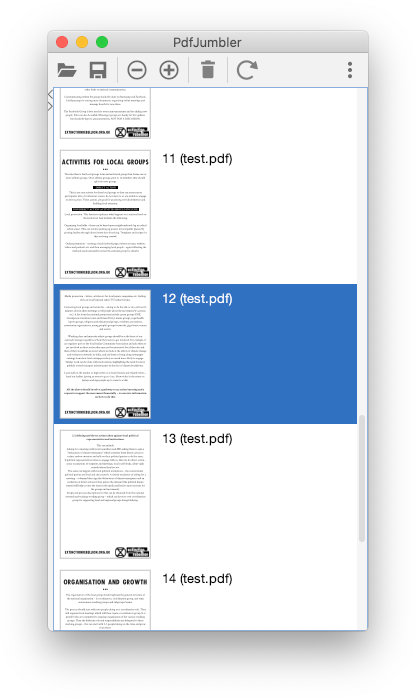
If you have ever struggled with a scanned document that saved upside down, or needed to quickly combine multiple documents into a single presentation, PdfJumbler PDF editor offers the exact solution you need. Instead of loading up a heavy, resource-intensive office suite, this dedicated Linux utility lets you manipulate document pages with zero fuss and maximum speed.
What is the PdfJumbler PDF Editor?
Developed by Martin Gropp, PdfJumbler is a streamlined, open-source utility built specifically for the Linux platform. Categorized under IT tools, its entire philosophy revolves around doing a few critical tasks exceptionally well. Rather than trying to compete with full-scale PDF creation suites, it focuses entirely on page-level manipulation, giving users a visual sandbox to reorganize their documents.
Key Features and Capabilities
The beauty of this tool lies in its simplicity. Here is what you can achieve in just a few clicks:
- Seamless Page Rearranging: Drag and drop pages to change their order instantly.
- Document Merging: Combine multiple separate PDF files into a single, cohesive document.
- Quick Page Deletion: Strip out blank pages, unwanted cover sheets, or unnecessary appendices.
- Flexible Rotation: Correct misaligned scans by rotating individual pages or entire selections.
Who is This Tool For?
This utility is a perfect match for Linux users who frequently handle digital paperwork, academic research, or scanned invoices. Because it bypasses complex editing menus in favor of a straightforward visual interface, it requires absolutely no learning curve. It is especially valuable for those running modest hardware setups who need a fast, responsive tool that opens instantly.
Our Editorial Verdict
PdfJumbler PDF editor excels by embracing minimalist design. It does not try to edit text or add digital signatures; instead, it provides a highly stable environment for structural PDF changes. If you want a clean, distraction-free environment to clean up your documents, this tool is highly recommended.
To try this utility yourself, head over to the official Flathub store page to explore its installation options for your Linux distribution.